What Is the Difference Between WhatsApp Business App and WhatsApp Business API?
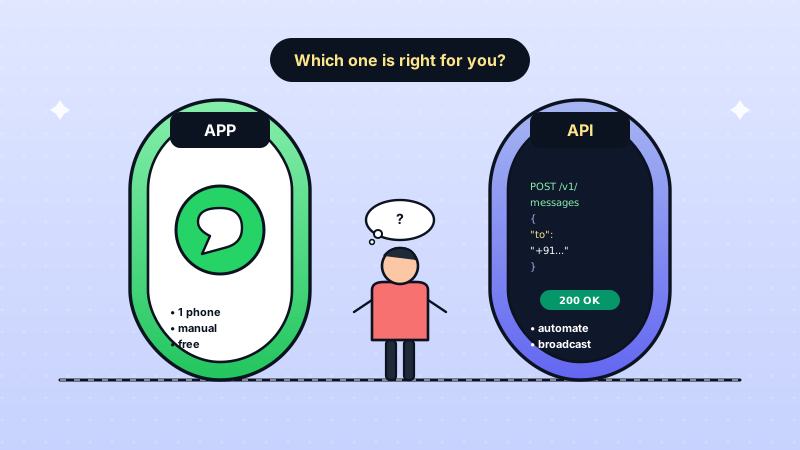
The WhatsApp Business App is a free mobile application designed for solo entrepreneurs and micro-businesses, while the WhatsApp Business API is a programmable interface built for medium to large businesses that need multi-agent access, automation, and integration capabilities. The App is a product you use directly; the API is infrastructure you build on through a provider like WatEase.
This distinction matters because many Indian businesses start with the free app, outgrow it within months, and then face the decision of when and how to upgrade. Making this decision at the right time can mean the difference between scaling smoothly and losing customers to slow response times and manual bottlenecks.
Whether you run a retail store, a healthcare practice, or an educational institution, understanding both options helps you pick the right tool for your current stage and plan for growth.
What Features Does the WhatsApp Business App Offer?
The WhatsApp Business App is free and available on Android and iOS. It provides several features beyond the regular WhatsApp:
- Business profile: Display your address, business hours, website, and description.
- Catalogue: Showcase up to 500 products or services with images, descriptions, and prices.
- Quick replies: Save and reuse frequent responses with keyboard shortcuts.
- Labels: Organize contacts and chats with colour-coded labels (up to 20 labels).
- Away messages: Auto-respond when you are unavailable.
- Greeting messages: Automatically greet new customers.
- Broadcast lists: Send messages to up to 256 contacts at a time.
- Short links and QR codes: Make it easy for customers to start a conversation.
For a new business receiving fewer than 50 messages per day and managed by one person, the app works perfectly well. It is simple, familiar, and costs nothing.
What Does the WhatsApp Business API Provide That the App Cannot?
The API unlocks capabilities that the app simply cannot offer, regardless of how creatively you use it:
Multi-Agent Access
The app is limited to one phone and one linked device (up to 4 linked devices on newer versions). The API allows unlimited team members to manage conversations from a shared dashboard. For businesses with dedicated sales and support teams, this is non-negotiable.
Advanced Automation and Chatbots
While the app offers basic auto-replies, the API supports sophisticated chatbot flows, workflow automation, and AI-powered responses. You can build complete customer journeys that run without human intervention.
Bulk Messaging at Scale
The app limits broadcasts to 256 contacts per list, and recipients must have your number saved. The API supports broadcasts to thousands of contacts without the saved-contact requirement, using pre-approved template messages.
CRM and System Integration
The API connects to your existing CRM, e-commerce platform, payment gateway, helpdesk, and any other business system through webhooks and APIs. The app operates in isolation. Building a proper WhatsApp CRM is only possible with the API.
Analytics and Reporting
The app provides no analytics. The API (through providers like WatEase) offers detailed dashboards tracking delivery rates, read rates, response times, agent performance, and campaign ROI.
Green Tick Verification
Only API users can apply for the official green tick badge that signals legitimacy and builds customer trust.
Run your business on WhatsApp with WatEase
Set up in minutes with guided onboarding. 0% markup on WhatsApp messages.
Get started →Want a plan sized to you? Get a quote
How Does Pricing Compare Between the App and the API?
This is where the decision gets practical. Here is a clear breakdown:
WhatsApp Business App:
- Download and use: Free
- No per-message charges
- No subscription fees
- Hidden cost: Staff time spent on manual work
WhatsApp Business API:
- Platform subscription: Varies by provider (WatEase is priced on request, with a plan customised to your business; see our pricing page)
- Per-message charges from Meta:
- Marketing messages: Higher rate
- Utility messages (order updates, alerts): Lower rate
- Service messages (customer-initiated): Meta charges them at the utility rate from 1 October 2026, after the first 1,000 a month per business number (see Meta's current pricing)
- Authentication messages: Same rate as utility
- No charge for the API itself
The key calculation most businesses miss: the cost of not upgrading. If you are losing leads because you cannot respond fast enough, missing follow-ups because you have no automation, or burning staff hours on repetitive tasks, the API pays for itself within the first month.
A real estate agency handling 100 leads per month that converts just 2 additional leads thanks to faster response times and automated follow-ups more than covers the API cost.
When Should You Upgrade from the App to the API?
Look for these signals that indicate you have outgrown the app:
- Multiple people need to respond: If more than one person handles customer messages, the app creates chaos with its single-device limitation.
- More than 100 messages per day: Manual handling becomes unsustainable and response times start slipping.
- You need broadcast capability: If you want to run marketing campaigns to more than 256 contacts, the app cannot help you.
- Customer data lives in multiple places: When you are copying information between WhatsApp and your CRM, spreadsheet, or billing system, integration through the API eliminates this friction.
- You are losing leads to slow responses: If prospects message you and do not hear back within 5 minutes during business hours, many will move to a competitor.
- You want to automate repetitive tasks: Answering the same 10 questions hundreds of times per week is a clear sign you need chatbot automation.
Most Indian businesses reach this point within 6-12 months of seriously using WhatsApp for business. The sooner you recognize these signals, the fewer customers you lose in the transition.
How Do You Migrate from the WhatsApp Business App to the API?
Migration does not have to be disruptive. Here is how WatEase handles it:
Step 1: Facebook Business Verification
You need a verified Facebook Business Manager account. This involves submitting your business documents (GST certificate, PAN, or incorporation certificate). Verification typically takes 2-7 business days.
Step 2: Choose Your Number Strategy
You have two options:
- Migrate your existing number: Customers keep the same contact. There is a brief downtime during migration.
- Use a new number: No downtime, but you need to inform customers of the change.
Most businesses migrate their existing number to maintain continuity.
Step 3: Platform Setup
WatEase configures your API account, sets up your dashboard, imports your contact labels (where possible), and helps you create your first message templates.
Step 4: Template Approval
Submit your message templates to Meta for approval. WatEase guides you on template best practices to ensure quick approval. This usually takes a few hours to a day.
Step 5: Team Onboarding
Add your team members, set up assignment rules, configure working hours, and establish escalation workflows.
Step 6: Go Live
Start receiving and sending messages through the API. Your customers notice no difference except faster, more professional responses.
What Should Indian Businesses Consider Before Choosing?
The decision ultimately comes down to your growth trajectory. The app is sufficient if you are a solo operator with low volume and no need for automation. The API is essential once you have a team, need scale, or want to use WhatsApp as a serious business channel rather than a casual communication tool.
Here is a quick decision matrix:
| Factor | Choose App | Choose API |
|---|---|---|
| Team size | 1 person | 2+ people |
| Daily messages | Under 50 | Over 50 |
| Automation needs | Basic auto-replies | Chatbots, workflows |
| Marketing campaigns | Minimal | Regular broadcasts |
| System integration | Not needed | CRM, payments, etc. |
| Budget | Zero | Ready to invest |
The good news is that starting with the API does not have to be expensive or complicated. With providers like WatEase, you can be up and running in a day and scale at your own pace.
Get started with WatEase today and unlock the full potential of WhatsApp for your business. Visit our features page to see everything the platform offers.
For the canonical reference on API capabilities and the latest pricing, see the official WhatsApp Business Platform documentation. If you're also planning a website or organic-discovery strategy alongside WhatsApp, our SEO playbook for Indian D2C brands covers the search side of the funnel that complements the conversational layer.