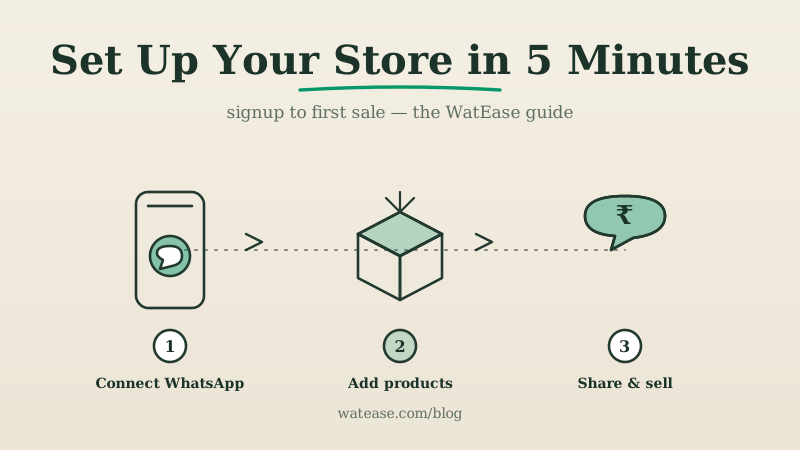
This is the complete, screen-by-screen guide to setting up your store on WatEase — from creating an account to capturing your first sale. WatEase is an India-first WhatsApp commerce platform, so everything here is built around UPI, GST, and the way Indian buyers actually shop. Most sellers go live in under five minutes; this guide adds the details that help turn a live store into a selling one. If you want the conceptual background first, start with what WhatsApp commerce is.
What Is WatEase and Who Is It For?
WatEase is a platform that turns WhatsApp into a complete storefront — catalog, checkout, payments, invoicing, and customer messaging in one place. It is built for Indian businesses: retailers, D2C brands, wholesalers, restaurants, clinics, and service providers who want to sell where their customers already are.
Unlike a generic chatbot tool, WatEase is a full WhatsApp commerce platform that combines a commerce engine (store, orders, UPI checkout, GST invoicing, CRM) with a marketing layer (broadcasts, automation, and cross-channel attribution). You can see the full feature set on the features page and industry-specific setups under industries.
How Do You Create Your WatEase Account?
Account creation takes about a minute. Visit the registration page and complete three quick steps.
Step 1: Enter your details. Provide your business email and phone number, then verify with the OTP sent to you.
Step 2: Add business information. Fill in your store name, business category, and address. This information populates your storefront profile and every order receipt, so use the name customers will recognise.
Step 3: Get your plan quoted. Tell us your use case and we quote a plan that fits (priced on request), covering catalog, orders, payments, automation, CRM, and GST invoicing; it grows with you as your volume does. See the pricing page.
Your account is ready. Next, connect WhatsApp.
How Do You Connect Your WhatsApp Number?
WatEase connects your number to the WhatsApp Business Platform during onboarding — no separate API application and no code. Use a dedicated business number, not your personal one.
Follow the in-app prompts to scan a QR code, much like setting up WhatsApp Web. If the connection fails, the number is almost always still active on the consumer WhatsApp or WhatsApp Business app — a number can run on the API or the app, not both. Remove it from the app first, or use a fresh business number, then retry. For the difference between the app and the API, read WhatsApp Business API vs the App.
Run your business on WhatsApp with WatEase
Set up in minutes with guided onboarding. 0% markup on WhatsApp messages.
Get started →Want a plan sized to you? Get a quote
How Do You Build Your Catalog?
Your catalog is the heart of your store, and a well-organised one tends to make buyers more likely to convert. WatEase gives you a visual product manager plus bulk tools for scale.
To add a product:
- Open the Products section in your dashboard
- Click Add Product
- Upload 1–4 square images (800×800px gives the best result)
- Enter the name, description, and price
- Set stock status — in stock, limited, or out of stock
- Assign a category, such as "Men's Clothing" or "Skincare"
- Save
To move faster, use CSV import to add 100+ products at once, or the Shopify/WooCommerce sync to mirror an existing catalog. Keep your launch catalog focused — a tight selection of your 10–20 best items often converts better than an overwhelming list. Our catalog best-practices guide has the full playbook.
How Do You Enable Payments and GST Billing?
Payments are where your store becomes a business. WatEase supports every major Indian payment method and generates GST-compliant invoices automatically.
Connect payments under Settings → Payments:
- UPI — direct bank-to-bank at 0% MDR; the default for most Indian buyers
- Razorpay — cards, net banking, UPI, and wallets in one integration (~2% per card transaction)
- PhonePe and Paytm gateways — popular with buyers who prefer those wallets
- Cash on delivery — for buyers who prefer paying on receipt
For GST, enter your GSTIN under business settings; WatEase then raises compliant tax invoices on every order, supporting GSTR-1/3B and e-invoice IRN where applicable. If your turnover is below ₹40 lakh (goods) or ₹20 lakh (services), GST is optional — but adding it builds trust and unlocks some gateway features.
How Do You Set Up Automated Replies?
Automation keeps your store selling even when you are asleep or busy. Configure these flows before you share your link so no message goes unanswered.
- Welcome message — greets every new contact and shows your catalog instantly
- Order confirmation — sent automatically when an order is placed
- Payment reminder — follows up on unpaid orders after a set interval
- Shipping update — notifies buyers when their order ships
- Away message — sets expectations when you are offline
Slow first responses are a common reason new stores lose buyers — when a greeting doesn't arrive promptly, interest tends to fade and the sale can slip away. A fast, automated welcome flow helps avoid this from day one. For deeper automation, see our WhatsApp automation and chatbot guide.
How Do You Share Your Store and Make Your First Sale?
Your store is live — now it needs buyers. WatEase generates a shareable store link and QR code; the first orders typically come from people who already know you.
Take these actions immediately:
- Post your store link and a "Now taking orders on WhatsApp" note on your WhatsApp status
- Add the link to your Instagram and Facebook bios and pin a product post
- Put your WhatsApp number on your Google Business Profile so local buyers can message you
- Print the QR code on packaging, visiting cards, and your shop counter
- Send a one-time, consented broadcast to your existing customer list
Then watch the orders arrive in your unified inbox, where you can confirm, invoice, and update buyers in one thread. To grow beyond the first wave, layer in WhatsApp marketing campaigns and click-to-WhatsApp ads.
What Should You Do After Your First Week?
Once orders are flowing, shift from setup to optimisation. The biggest gains come from removing friction and bringing buyers back.
- Turn on abandoned-cart recovery to win back buyers who didn't complete payment
- Use analytics to spot best-sellers and peak ordering times
- Expand the catalog based on what customers actually ask for
- Explore your industry-specific setup — for example retail or food — for tailored flows
Setup is a one-time, five-minute task; growth is the ongoing work. Create your WatEase account to begin, and keep the official Meta WhatsApp Business Platform documentation handy for the underlying platform details.